Book an Appointment
Call Karls Technology at 1-800-620-5285
                   

1-800-620-5285


Karls Technology Computer Service is your one stop for mobile computer repair, IT consulting and application and web development. We have multiple computer repair shops in the Phoenix, Tucson, Las Vegas, San Diego, Salt Lake City, Denver, Dallas-Fort Worth, Tampa, Orlando, Houston, Miami, Minneapolis-Saint Paul, Atlanta, Charlotte, Kansas City, Austin, San Antonio, Virginia Beach, Raleigh, Detroit, St. Louis, Pittsburgh, Cincinnati, Columbus, Indianapolis, Cleveland, Nashville, Jacksonville, Oklahoma City, Memphis, Richmond, Louisville, Baltimore and Milwaukee metropolitan areas.

We specialize in small business IT consulting, web development, SEO, SEM, data recovery, virus removal and remote / mobile computer repair.

Do you need a computer repair or computer service company?

4.9 / 5 stars from 948 reviews
Why use a computer tech when you can have a San Tan Valley based Computer Engineer for computer repair? Matt Karls Mon-Sun 8:00am - 8:00pm

Call us at 1-800-620-5285

Text us at (602) 633-4584

Email us your questions

Book an Appointment

Who is Karls Technology Computer Service?

Karls Technology is owned by Matt Karls, an Electrical Engineer and a Computer Systems Engineer. We are a family owned and run computer repair company focused on service and quality, all our work is guaranteed.

If you need computer repair, computer service or have any technology problem, we are here to help you! Give us a call to fix all your computer problems at 1-800-620-5285 or text us at (602) 633-4584.
Karls Technology's Computer Engineer

What is your service area for mobile Computer Repair?

We started in 1999, with one person, servicing customers in Mesa, AZ with a then new concept of fixing computers in customer's homes. Today, we have expanded to a large team of field engineers servicing customers nationwide.
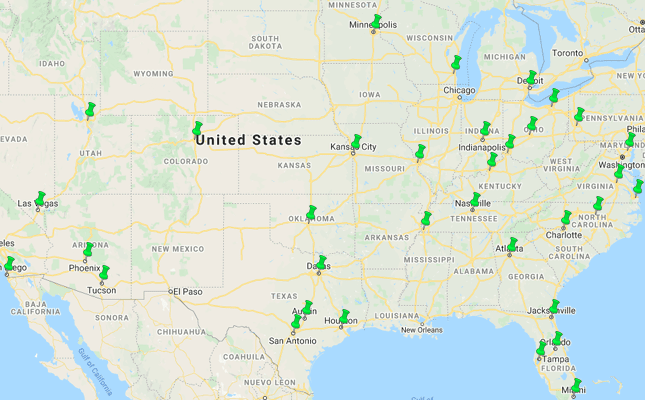
Karls Technology Mobile Computer Repair Service Area

Currently, we provide on-site mobile computer repair service to all the cities in the Phoenix, Tucson, Las Vegas, San Diego, Salt Lake City, Denver, Dallas-Fort Worth, Tampa, Orlando, Houston, Miami, Minneapolis-Saint Paul, Atlanta, Charlotte, Kansas City, Austin, San Antonio, Virginia Beach, Raleigh, Detroit, St. Louis, Pittsburgh, Cincinnati, Columbus, Indianapolis, Cleveland, Nashville, Jacksonville, Oklahoma City, Memphis, Richmond, Louisville, Baltimore and Milwaukee metropolitan areas.

What should someone expect that hires you for Computer Service?

Our mission is to fully resolve your computer problems quickly and affordably. If you want a Computer Engineer that can fix all of your computer repair and computer service problems instead of a computer tech, a computer geek, a technician or a computer guy that can only fix some of your computer problems; call us at 1-800-620-5285.  

What types of Computer Repair Services do you perform?

We provide services to businesses and clients in their homes, including:
 
  • Diagnose / repair hardware or software problems
  • Spyware, malware, trojan and virus removal
  • Setup wireless and small business networks
  • Laptop repair, PC repair and Apple repair
  • Hard drive data recovery

Karls Technology Contact Information

We have multiple offices nationwide across the United States, call us at 1-800-620-5285 to find the closest office or book an appointment online.

Book an Appointment

Open Positions and Careers at Karls Technology

Our dedication to be IT Heroes for our clients is built by many hard working individuals, if you are looking for a job or want to build a career at Karls Technology, see our current open job listings.

Additional areas we service: Ahwatukee, Arlington, Arvada, Aurora, Boulder, Buckeye, Chandler, Clearwater, Fort Lauderdale, Fountain Hills, Frisco, Garland, Gilbert, Glendale, Goodyear, Grand Prairie, Henderson, Hollywood, Irving, Kissimmee, Lakewood, Largo, Littleton, Mesa, McKinney, Paradise Valley, Peoria, Plano, Queen Creek, Sandy, San Tan Valley, St. Petersburg, Scottsdale, Sun City, Sun Lakes, Surprise, Tempe, Thornton


  © 1999-2026 Karls Technology | Jobs | Terms of Service | Privacy Policy


4.9 / 5 stars from 948 reviews

"Matt and Santino were very knowledgeable and helpful. They fixed all of my issues. I will definitely use your company and them again."

Karls Technology 5 / 5 stars

"Excellent, all is working, amazing service!"

Karls Technology 5 / 5 stars

"These guys are great! I have been using them for years. Always a job well done. No need to call anyone else."

Karls Technology 5 / 5 stars

"The service I received today was absolutely outstanding. They arrived on time and the service was very professional. They were willing to explain to me exactly what was wrong and didn't speak to me like I was a complete idiot, which was refreshing."

Karls Technology 5 / 5 stars
Best Antivirus Software of 2026: The Ultimate Guide to Cybersecurity Brands

In 2026, the digital threat landscape has shifted. We are no longer just fighting simple viruses; we are defending against AI-generated phishing, sophisticated ransomware-as-a-service, and complex identity theft. Choosing the right antivirus brand is no longer optional—it is the foundation of your digital life. At Karls Technology, we’ve analyzed the top-performing security suites of the […] The post Best Antivirus Software of 2026: The Ultimate Guide to Cybersecurity Brands appeared first on Computer Repair Blog.

Don’t Install Unfamiliar Browser Extensions

You should be aware of how unsafe it is to install software on your personal computer that you are unfamiliar with and have no idea what it does. Including things like putting in browser extensions. Users assumed browser add-ons were safe because they were uninformed about the dangers they could offer. In short, be weary […] The post Don’t Install Unfamiliar Browser Extensions appeared first on Computer Repair Blog.

Removing Icons on Desktop

One of the quickest and easiest methods to free up space and boost Windows 10’s performance is to get rid of the icons cluttering your desktop. In Windows 10, you can quickly and easily clear your desktop of icons with only a few clicks. It’s as simple as right-clicking an icon on the Windows 10 […] The post Removing Icons on Desktop appeared first on Computer Repair Blog.

Windows OS is Unresponsive – Fast Startup

Turning off this feature could be the quickest and easiest approach to solve this problem. The useful function known as “Fast Startup” maintains your Windows OS in the hibernation mode so that it does not need to be completely relaunched after it has been shut down. This results in a significantly quicker reboot. Even though […] The post Windows OS is Unresponsive – Fast Startup appeared first on Computer Repair Blog.

Windows 11 Remote Desktop Issues

Microsoft is looking into reports of Remote Desktop issues on Windows 11 computers following installation of the Windows 11 2022 Update. According to Bleeping Computer, it is possible that after upgrading to Windows 11 22H2, Remote Desktop clients will either fail to connect, detach unexpectedly, or stop working altogether. Until Microsoft releases official fixes, you […] The post Windows 11 Remote Desktop Issues appeared first on Computer Repair Blog.

Smart App Control on Windows

Microsoft’s newest Windows 11 update (22H2) came with a plethora of new features. One in particular is the Smart App Control, or SAC. What is SAC? According to Microsoft, the capacity of Smart App Control to terminate potentially dangerous or otherwise unreliable applications enables an effective defense against new and unanticipated threats. With the SAC, […] The post Smart App Control on Windows appeared first on Computer Repair Blog.

Check if Website is Safe

You can inquire as to the security of a website using Google if you have doubts as to whether or not it is dangerous. According to famous tech company, Google’s unified approach to security, dubbed “Safe Browsing,” enables safer Internet experiences for users everywhere. To check to see if the website you’re wishing to visit […] The post Check if Website is Safe appeared first on Computer Repair Blog.

Apple Says No to Increased Prices

Apple, TSMC’s largest customer, has reportedly rejected the supplier’s plans to increase chip prices in 2019. There will be a price increase of around 9% implemented by TSMC. The Taiwan Semiconductor Manufacturing Company (TSMC) produces all of Apple’s custom silicon chips. In order to preserve its premium and pass on increased expenditures to customers, the […] The post Apple Says No to Increased Prices appeared first on Computer Repair Blog.

Change Windows Update Times

You can alter the the times your computer is available to update. And it’s easy to do so. Schedule Windows Update to begin and end at certain times. The configuration tool may be launched by searching the Windows Update settings. The parameters may be updated to alter the active times. Select new working hours here. […] The post Change Windows Update Times appeared first on Computer Repair Blog.

Remove Tips and Tricks Recommendation

Users want to get the most out of their Windows 10 PC. Microsoft keeps tabs on your activity and suggests new features and settings. Windows’ ability to track your activity and provide tailored suggestions could reduce performance. To speed up the process, instruct Windows to cease making Tips and Tricks recommendations. Start by selecting the […] The post Remove Tips and Tricks Recommendation appeared first on Computer Repair Blog.